Posted by Lakesen Guo on
The High Definition Multimedia Interface (HDMI) was developed in 2002 as an improved means of transferring uncompressed digital video and audio data from a source to a monitor, television, or video projector. Before the development of HDMI, connections for high-density (HD) television were limited to either through DVI (Digital Video Interface, which was actually developed for computer monitors) or component video. Component video uses three separate video cables and two audio cables, all of which are included in the HDMI interface.
While HDMI cables are definitely the way to go for connecting any home theater system or home entertainment center, actually buying the cables can be a bit confusing. The HDMI specification makes provisions for a number of different cable types and a number of different connectors. Without knowing which type to buy, one could easily end up with the wrong item. This guide is intended to eliminate that confusion and clearly demonstrate what purposes the different types of cables and connectors are used for.

HDMI CONNECTOR TYPES
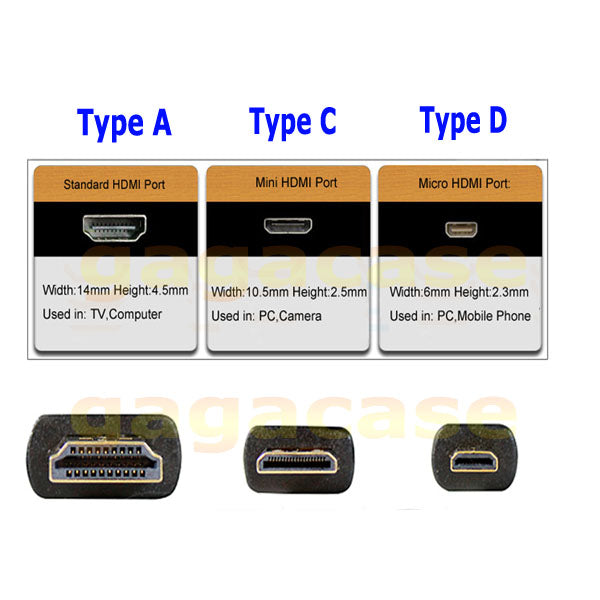
The basic HDMI scheme calls for a 19-conductor cable and connector. There are five different connector types, each of which was created for a different purpose.
| HDMI CONNECTOR TYPE | PHYSICAL SIZE | USED FOR |
|---|---|---|
| Type A | 13.90 mm wide | Standard HDMI connector for use in digital audio/video connection applications. |
| Type B | 21.20 mm wide | A 29-pin version of the HDMI connector, which has never been used. |
| Type C | 10.42 mm wide | Designed specifically for use with portable equipment. |
| Type D | 6.40 mm wide | Designed specifically for use in compact portable equipment, such as cell phones. |
| Type E | 13.90 mm wide | Designed for automotive applications. Adds a latching shell to the standard connector, helping to prevent vibration-caused disconnects. |
While there is no requirement in the HDMI specification for labeling HDMI connectors on equipment with the type, the difference in size makes it fairly easy to determine which HDMI connector is being used on the equipment. Since most Americans are still uncomfortable working with metric measurements, measuring may be necessary.
If a metric ruler is not readily available for measuring HDMI connectors, a dime can be used as a fairly effective gauge. A Type A connector will be almost as wide as the dime; a Type C connector will be a little more than half the width of the dime; and a Type D connector will be less than half the width of the dime.
Type D HDMI Connectors and USB Micro connectors are of a similar size and appearance. However, they are not cross-compatible. It should be easy to determine the difference by the application. When all else fails, check the device’s owner’s manual.

 Rasfox